









Photo & storage cleaner · iOS and Android

Free up storage in one tap.

Find duplicates, blurry shots and junk — and clear it in one tap. Your media never leaves your device.

Coming soon to theApp StoreComing soon toGoogle Play
Scanning library…18 photos

0.0 MB recovered

A demonstration: of 18 sample photos, clean365 identifies 7 as duplicate copies and removes them, recovering 29.4 megabytes.

Features

Everything you need to clean up

A focused toolkit that clears the clutter without touching the photos you actually care about. Every panel below is the mechanic itself, running.

Duplicates, collapsed

Exact copies are grouped and shown side by side with the size of the set. One press keeps the best and clears the rest.

3 identical photos · only one is worth keeping

Secret Library

Moved photos leave your camera roll and your shared albums, behind a PIN that never leaves the device.

  • Unlockable with Face ID
  • Out of shared albums too
  • Only a salted hash is stored

An illustration of photos moving out of the camera roll into a PIN-locked space.

Blurry & junk shots

Soft frames, stale screenshots and the third try at the same photo, picked out for review.

An illustration of a soft-focus photograph being identified as blurry.

Contacts cleanup

Merge duplicate entries without losing the half each one was holding, and export a backup first.

An illustration of two partial contact entries for the same person merging into one that keeps both the phone number and the email address.

Watch it come back

Scroll, and the recoverable slice drains into free space. An illustration of the mechanic, not a promise of a number.

0.0 GB freed

A look inside

Four tabs, one job

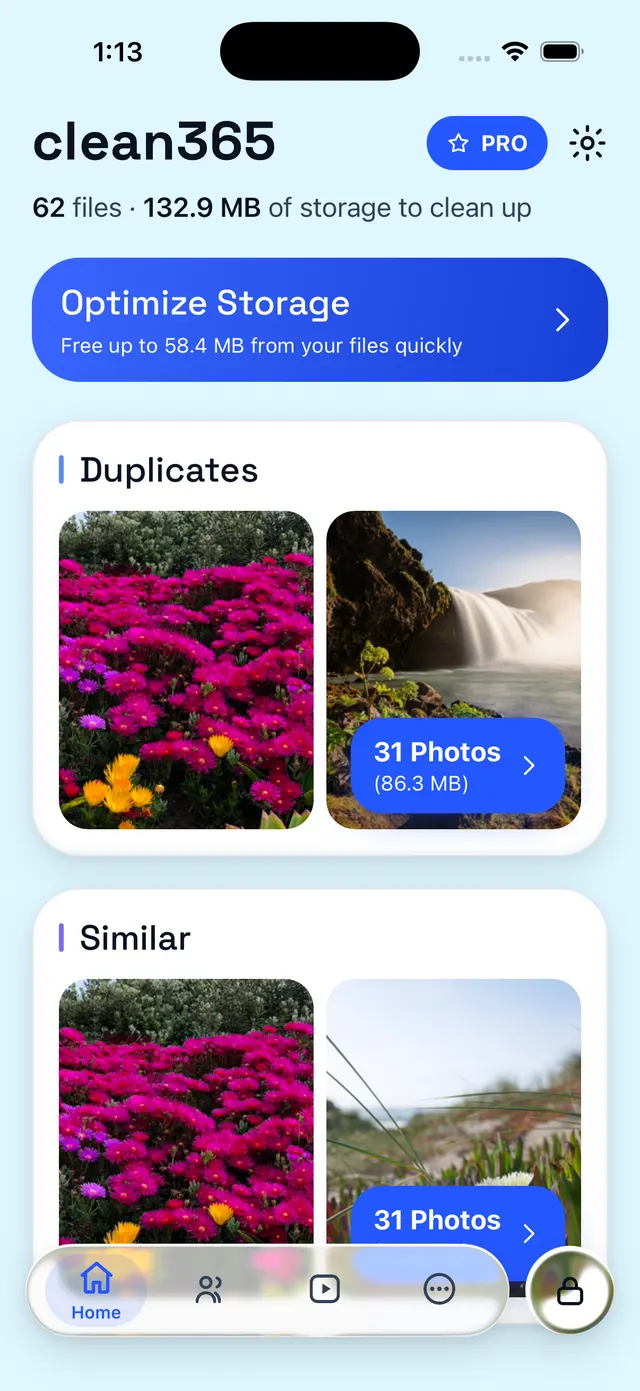
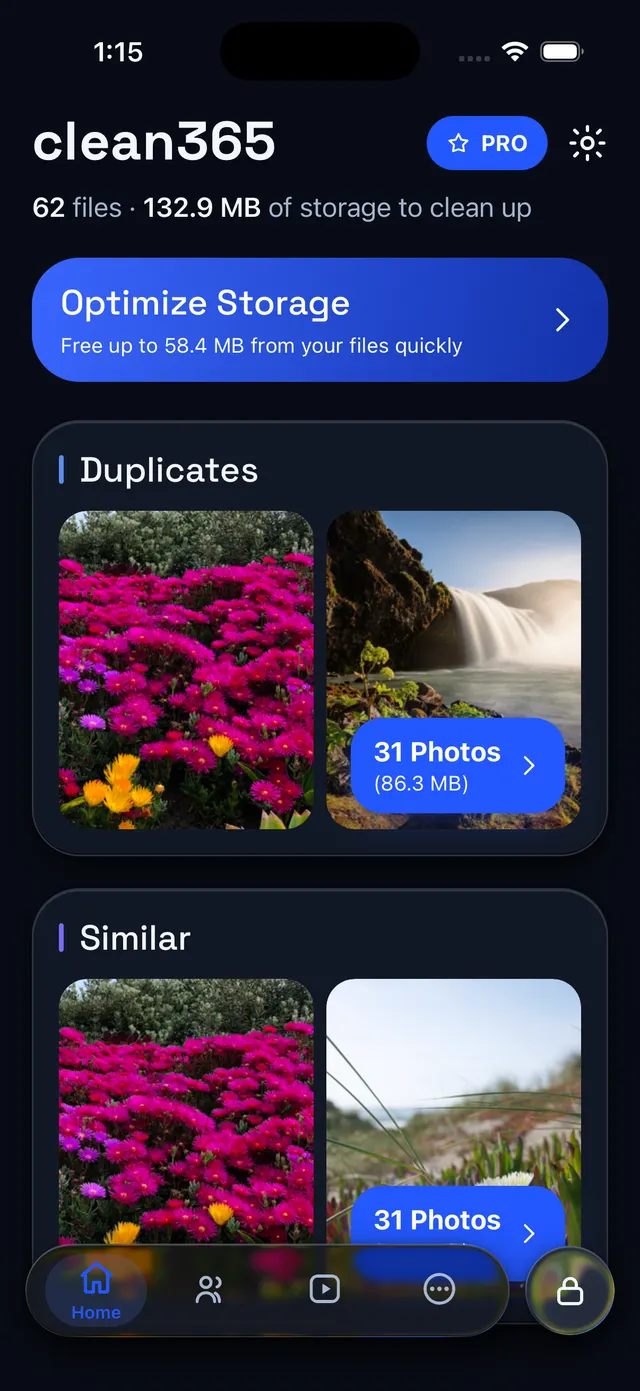
clean365 keeps its tools where you would look for them. These are the app's own screens, in whichever theme you are reading this in.

Everything worth clearing, grouped for you

The home screen opens on what it found: how many files and how much space is recoverable, with Optimize Storage as the one-tap route through all of it.

  • Exact duplicates grouped side by side, with the size of each set
  • Near-identical bursts separated from true copies
  • Nothing is removed until you confirm it
The clean365 home screen, reporting 62 files and 132.9 MB of storage to clean up, with grouped Duplicates and Similar photos found on the device.

How it works

Clean in three steps

Scan, review, and reclaim your space. The whole thing takes about a minute.

  1. Step 1

    Scan

    clean365 indexes your library on-device in seconds — no waiting on a server.

  2. Step 2

    Review

    See exactly what is junk, neatly grouped and ready. You always stay in control.

  3. Step 3

    Free up space

    Confirm once and reclaim gigabytes. Nothing is deleted until you say so.

Your photos never leave your phone

clean365 does all of its scanning, matching and cleanup right on your device. No cloud upload, no account required, and no one else ever looking through your library.

Read the privacy policy

Pricing

Free to use. Pro when you need more.

clean365 is free to download and every tool works without paying. Pro lifts the daily caps for people cleaning out a full library.

clean365 Pro

Pro

The same tools, without the caps.

  • Unlimited deletions
  • Unlimited Smart Clean runs
  • Unlimited contact merges
  • Unlimited video compression
  • Unlimited Live-to-Still conversions
  • An unlimited Secret Library

Subscriptions are billed through the App Store or Google Play and renew automatically unless cancelled at least 24 hours before the period ends. Current pricing for your country is shown in the app. See the Terms of Service.

FAQ

Questions people actually ask

  • Does clean365 upload my photos?

    No. Every scan and every match happens on your device. Your photos and videos are never sent to us or to any cloud service.

  • Do I need an account?

    No. Every cleanup feature works signed out. Signing in only gives you an email-and-password account we can tie a Pro subscription to, so you can restore it on another device. Your keep-list, settings, Secret Library and contact backups are stored on your phone either way, and are not synced to an account.

  • I deleted something by mistake — can I get it back?

    On iOS, yes, if you act quickly: removed items land in Recently Deleted in the Photos app and you can restore them there for 30 days. On Android, no. clean365 asks Android to delete the items and Android removes them from the device straight away — there is no Trash to fish them back out of, and we cannot recover them for you. If you keep a separate backup of your library, check whether a copy survived there. This is why clean365 always shows you exactly what it is about to delete before you confirm.

  • How do I cancel my subscription?

    Manage or cancel clean365 Pro from your store account: on iOS, Settings › your name › Subscriptions; on Android, Play Store › Subscriptions. Cancelling stops the next renewal and Pro stays active until the current period ends.

  • Which devices does clean365 support?

    clean365 runs on recent versions of iOS and Android. The website you are reading works in any modern browser, but scanning your library only happens in the mobile app.

More answers on the support page, or emailsupport@clean365.app.

Get your storage back

Free to download, works signed out, and nothing leaves your phone.

Coming soon to theApp StoreComing soon toGoogle Play